
ServiceNow’s upgrade to Vancouver is coming, and so are some incredible new features. However, there are some pretty important updates you must take note of. Simply must.

- The Next Experience: the time has come (..”the walrus said”..) to turn it on. With the Vancouver upgrade all customers UI’s will be turned on post upgrade. If the instance UI does not have a specific system property added PRIOR to the upgrade, per current release information, you will not be able to toggle it back off — unless you add the property below PRIOR to the upgrade.
// Note: Prior to the upgrade you need to go to 'sys_properties.list'
// and add the following system property
// **AND** set value to TRUE:

glide.ui.next_experience.opt_out
- To turn it off after the upgrade set the system property ‘glide.ui.polaris.experience’ to ‘false’
- Why do you care? The Next Experience includes incredible new features that are enabled out-of-the-box that may cause custom built experiences, widgets, etc to break or not work as expected. You may need to allow additional time to review, update, test and re-deploy with your upgrade.
- ServiceNow provides guidance on how to roll out the Next Experience by groups here
Instance Tools Utility Menu: By FAR, one of my personal favorite features with this release. ServiceNow has brilliantly added a new utility menu, which essentially takes the old update set picker and scope dropdowns out of the header and into their own menu. They called ‘Safe Harbor’ but I bet this new menu is going to continue to grow (over time releases) and have even more tools added in for us to use quickly.
To get the menu to show, add the system property:
- Name: glide.ui.next_experience.instance_tools_disabled
- Type: string
- Value: false

https://cdn.embedly.com/widgets/media.html?src=https%3A%2F%2Fwww.youtube.com%2Fembed%2FGor7GZlpXK4%3Ffeature%3Doembed&display_name=YouTube&url=https%3A%2F%2Fwww.youtube.com%2Fwatch%3Fv%3DGor7GZlpXK4&image=https%3A%2F%2Fi.ytimg.com%2Fvi%2FGor7GZlpXK4%2Fhqdefault.jpg&key=a19fcc184b9711e1b4764040d3dc5c07&type=text%2Fhtml&schema=youtubeServiceNow: Vancouver Upgrade — Instance Tools Utility Menu
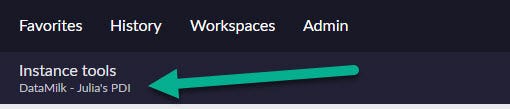
Another note for the Instance Tools Utility Menu — you can change the text on the far left on the menu

Navigate to system properties (sys_properties.list) and locate ‘glide.product.description’
Change the ‘value’ field to the new name you would like:

Submit your change and refresh. Voila — Instance Tools Utility Menu description is updated:
As we push through Q3 check back for other features coming with Vancouver.
In the mean time, don’t forget to stay up to date by checking out all of the webinars and content from ServiceNow Vancouver Release calendar
And if you want to see the webinar this came from, make sure to watch ‘The Next Experience Academy’ page for this webinar, on the ServiceNow community. Eventually they will post the recorded webinar.
Discover more from Julia's Dev
Subscribe to get the latest posts sent to your email.
 Julia's Dev
